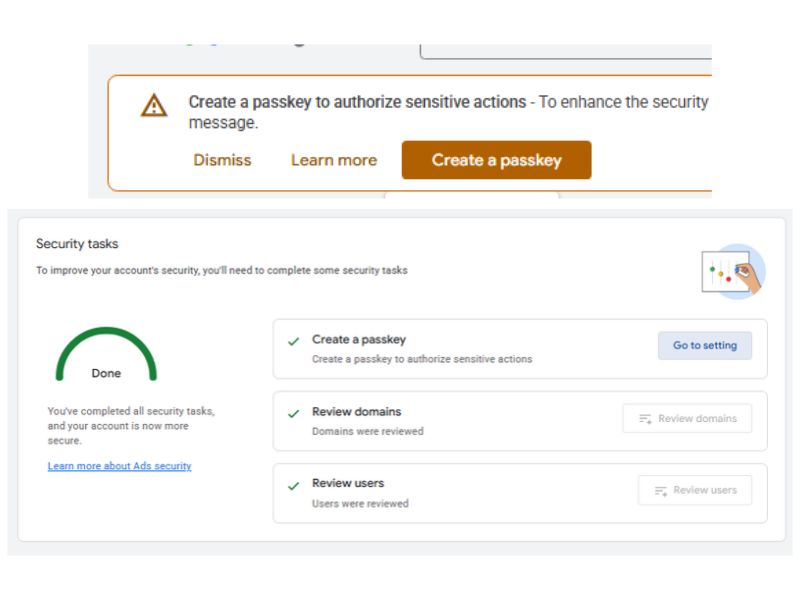
As of 2026, Google Ads requires advertisers to enable ‘Passkey’ as an additional layer of security. What exactly is Google Passkey and how do you enable it?
What Is Google Passkey?
Google Passkey is a security feature from Google that utilizes your device. At a glance, it works similarly to 2FA (Two-Factor Authentication) via SMS or Authenticator. The difference is that Passkey uses a device you registered and a credential you own (Password, PIN, Fingerprint), whereas 2FA uses a code generated by a third party. Thus, Google Passkey asks for confirmation through your devices to ensure that the action is indeed being performed by you.
How to Enable Google Passkey
To enable Google Passkey, there are several requirements to keep in mind.
Supported Devices
Not all devices can use Google Passkey; here are the requirements:
- Computers running at least Windows 10, macOS Ventura, or ChromeOS 109.
- Mobile phones running at least Android 9.0 or iOS 16.
- Security keys supporting the FIDO2 Protocol.
In addition, Bluetooth must be enabled across devices to verify that you are physically present at the location.
Supported Browsers
To access the passkey feature, use a browser with at least the following versions:
- Chrome 109
- Safari 16
- Edge 109
- Firefox 122
Do not use incognito or private browsing mode, as passkey cannot be accessed through it.
Creating a Google Passkey
Once your device is ready, it is time to create a Google Passkey. Here are the steps:
- Access the Google Passkey page here: Create a Passkey to Log Into Your Google Account – Google.
- Ensure that the correct email address is selected for using Passkey and click “Create a passkey”.
- Follow the instructions on your mobile device, such as scanning the QR code displayed on your computer screen and confirming via fingerprint, password, or PIN code.
- The Passkey is successfully created; you will usually receive a confirmation email from Google.
In addition to the email, there will be a list of your devices with Passkey activated, along with their last used time.
Google Passkey in Google Ads
Google Passkey is currently used by Google Ads to confirm Sensitive Actions, which are actions requiring additional verification, such as adding or removing Google Ads account admins.
FYI, after creating a Passkey, it takes about 1-2 days before it can be used in Google Ads.
To check the Passkey status in Google Ads, go to Admin > Access and security > Summary. You will find a checklist displaying “Create a passkey” there.